
Running a business online is not always easy. You need to manage social media accounts, send emails, follow up with potential customers, create content, run advertisements, and check your marketing results. When all these tasks are done manually, they can take a lot of time and effort. Sometimes, businesses even miss important opportunities because they are too busy handling everyday work.
This is where digital marketing automation becomes useful.
Digital marketing automation helps businesses manage repetitive marketing tasks automatically with the help of software and technology. It allows businesses to send emails at the right time, follow up with leads, schedule social media posts, organize customer information, and track campaign performance with less manual effort.
For example, imagine someone visits your website and signs up for your newsletter. Instead of manually sending that person a welcome email, an automation tool can send it automatically. A few days later, the same tool can send another email explaining your services or sharing helpful information.
This process saves time and helps businesses communicate with customers more consistently.
Digital marketing automation is useful for small businesses, startups, marketing agencies, online stores, educational institutions, and large companies. It helps marketers focus more on planning, creativity, and customer relationships instead of spending their entire day on repetitive tasks.
In this guide, we will explore what digital marketing automation is, how it works, its benefits, different types, popular tools, real-life examples, common mistakes, and how you can start using it for your business.
What Is Digital Marketing Automation?
Digital marketing automation is the process of using software and technology to perform repetitive marketing activities automatically. These activities may include email marketing, lead generation, customer follow-ups, social media scheduling, audience segmentation, and campaign reporting.
The main purpose of automation is to make marketing activities more organized, efficient, and consistent.
Without automation, a marketer may need to send every email manually, update customer records one by one, and remember when to contact each potential customer. As a business grows, managing these activities becomes more difficult.
Automation helps manage these tasks through predefined rules, schedules, and customer actions.
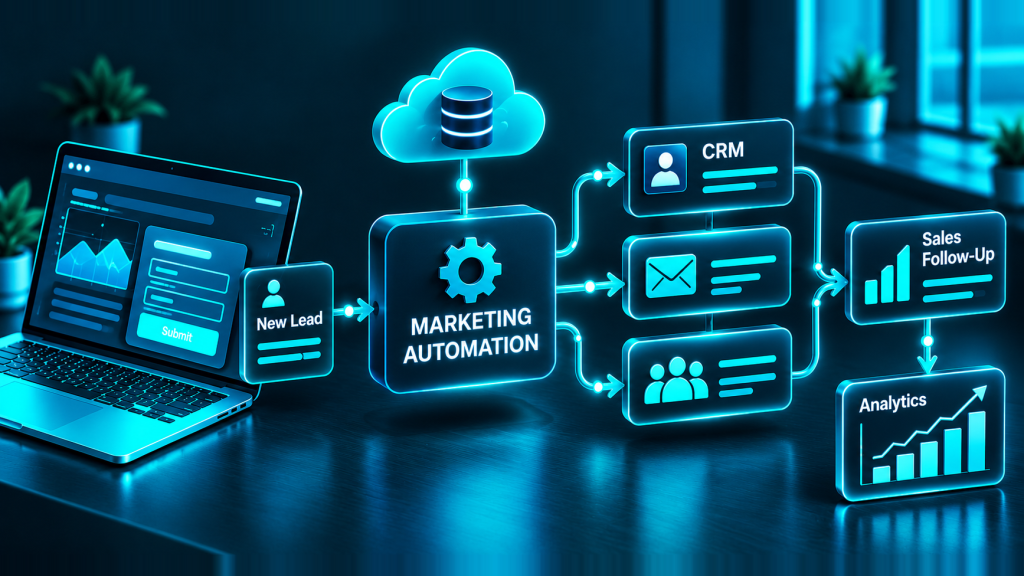
For example, a business can create a simple automated process:
A visitor opens the company’s website.
The visitor fills out a contact form.
The visitor receives an automatic confirmation email.
The business stores the visitor’s details in a customer management system.
A follow-up email introduces a relevant service.
The marketing team receives a notification when the visitor requests a consultation.
These actions can happen without someone manually completing every step.
However, digital marketing automation does not mean that the entire marketing process runs without human involvement. Businesses still need to create good content, understand their audience, make decisions, and maintain genuine relationships with customers.
Automation simply makes the process easier to manage.
How Does Digital Marketing Automation Work?
Digital marketing automation works by connecting customer information, marketing tools, and predefined actions. Once the system is configured, it responds to specific events or conditions.
Most automation processes have four basic elements: a trigger, a rule, an action, and a result.
1. Trigger
A trigger is an event that starts an automated process.
For example, a customer may subscribe to a newsletter, download a guide, complete a purchase, or submit a contact form.
2. Rule or condition
A rule determines what should happen next. It can help a business decide which message to send, when to send it, or which audience should receive it.
For example, an online store may send different emails to customers who purchased a product and visitors who only added a product to their cart.
3. Action
An action is the task performed by the automation software. It might send an email, update a customer record, assign a lead to a salesperson, or schedule a notification.
4. Result
The result is the outcome of the automated process. A business may receive more inquiries, improve customer engagement, save time, or gain better information about campaign performance.
Consider a digital marketing agency that wants to attract new clients. When someone downloads its free SEO checklist, the system can automatically send the checklist by email. Later, it can share SEO tips and explain the agency’s services.
If the person requests a consultation, the agency’s team can contact them personally.
This combination of automation and human communication creates a more organized customer experience.
Why Is Digital Marketing Automation Important?
Modern customers interact with businesses through many online channels. They may discover a company through Google, visit its website, follow it on social media, subscribe to its emails, and eventually purchase a product or service.
Managing these interactions manually can become complicated.
Digital marketing automation helps businesses maintain communication across different stages of the customer journey. Instead of depending entirely on manual work, businesses can create repeatable processes that support their marketing goals.
Here are some reasons why automation is becoming important.
It saves time: Repetitive activities can run automatically, giving marketers more time for creative and strategic work.
It improves consistency: Customers can receive timely messages instead of waiting for someone to remember a follow-up.
It supports personalization: Businesses can send relevant messages based on customer interests, preferences, and previous actions.
It organizes customer information: Automation can help collect and update information in one system, making it easier to understand customer needs.
It supports business growth: A well-designed workflow can manage more leads and customer interactions without requiring every task to be handled manually.
Automation is not a replacement for good marketing. It is a way to deliver good marketing more efficiently.
1. Email Marketing Automation
Email marketing automation is one of the most common forms of digital marketing automation. It allows businesses to send emails automatically when a subscriber performs a particular action or reaches a scheduled point in a campaign.
For example, when someone joins an email list, the system can send a welcome email. After a few days, it may send useful tips, product information, or a special offer.
Common email automation activities include:
Welcome emails for new subscribers.
Follow-up emails after a customer inquiry.
Educational email sequences.
Birthday or anniversary messages when appropriate.
Order confirmations and delivery updates.
Reminders for incomplete purchases.
Re-engagement emails for inactive subscribers.
Email automation helps businesses maintain regular communication without manually preparing every individual message.
However, businesses should always respect email consent, privacy requirements, and unsubscribe requests.
2. Social Media Automation
Social media marketing requires regular posting, monitoring, and communication. Automation tools help businesses plan and manage these activities more efficiently.
For example, a business can prepare a week’s worth of posts and schedule them to publish at selected times. The team can then spend more time responding to comments, creating better content, and understanding audience reactions.
Social media automation may include:
Scheduling posts in advance.
Organizing content calendars.
Receiving notifications about selected activities.
Monitoring basic engagement metrics.
Preparing reports about social media performance.
Automation should not make social media communication feel robotic. Customers still appreciate real responses, meaningful conversations, and content that reflects the brand’s personality.
3. Lead Generation Automation
Lead generation means attracting people who may be interested in a business’s products or services and collecting their contact information appropriately.
Automation can help businesses capture and organize these potential customers.
For example, a website visitor may fill out a form to receive a free marketing guide. The system can store the person’s details, send the guide, and notify the marketing team.
Lead generation automation may include:
Website contact forms.
Landing page form submissions.
Automatic confirmation emails.
Lead notifications.
Lead source tracking.
Automatic assignment of inquiries to team members.
This process helps businesses respond more quickly and reduces the chance of losing an inquiry because someone forgot to check a form.
4. Customer Relationship Management (CRM) Automation
Customer Relationship Management, commonly known as CRM, involves managing information about customers and potential customers.
CRM automation helps businesses organize contact details, record interactions, update lead stages, and remind team members about important follow-ups.
For example, a digital marketing agency might classify its leads into different stages:
New inquiry.
Contacted.
Meeting scheduled.
Proposal sent.
Client converted.
When a lead moves from one stage to another, the CRM system may update the record and notify the relevant team member.
This helps businesses understand which opportunities need attention and which parts of the sales process require improvement.
5. Paid Advertising Automation
Paid advertising automation helps businesses manage and optimize online advertising campaigns through platform features and marketing tools.
Advertising platforms may use automation to adjust bids, distribute budgets, identify relevant audiences, and optimize delivery toward selected goals.
For example, a business running Google Ads may use automated bidding to help achieve a target cost per acquisition or maximize conversions, depending on campaign eligibility and configuration.
Advertising automation can support:
Automated bidding strategies.
Campaign scheduling.
Rules for budget monitoring.
Conversion tracking.
Automated performance reports.
Alerts for unusual spending or campaign activity.
However, automation does not guarantee profitable advertising. Campaigns still need appropriate targeting, good landing pages, accurate conversion tracking, and regular performance reviews.
6. Content Marketing Automation
Content marketing involves creating useful information to attract and educate an audience. This may include blog posts, videos, guides, newsletters, and social media content.
Automation can help organize and distribute this content.
For example, after publishing a new blog post, a business can schedule social media posts to promote it. Subscribers who have chosen to receive updates may also receive a newsletter featuring the article.
Content marketing automation can support:
Content scheduling.
Newsletter distribution.
Content calendar reminders.
Automatic sharing through connected platforms.
Content performance reporting.
Segmentation of content by audience interest.
The content itself still needs human planning, editing, research, and quality control. Automation can distribute valuable content, but it cannot make poor content useful.
7. E-Commerce Automation
Online stores often manage many customer interactions, including orders, payments, deliveries, abandoned carts, and repeat purchases.
E-commerce automation helps businesses manage these activities more efficiently.
Examples include order confirmation emails, shipping notifications, low-stock alerts, and reminders for customers who leave items in their shopping carts.
A store may also recommend related products based on previous purchases, provided the recommendations are relevant and handled appropriately.
These automated processes help customers receive useful information and allow store owners to focus on products, customer service, and business growth.
Benefits of Digital Marketing Automation
Digital marketing automation offers several benefits when it is planned and managed properly.
1. Saves Time and Reduces Repetitive Work
One of the biggest benefits of automation is the time it saves.
Imagine sending a welcome email to every new subscriber manually. If your website receives many new subscribers every day, this task can take up a significant amount of time.
With email automation, you can prepare the message once and allow the system to send it whenever someone subscribes.
The same principle applies to appointment reminders, lead notifications, social media scheduling, and reporting.
This gives marketers more time to work on strategy, research, and creative ideas.
2. Improves Customer Experience
Customers appreciate timely and relevant communication.
When someone requests information about a service, receiving a confirmation message can provide reassurance that their request has been received.
Similarly, customers benefit from order updates, helpful instructions, and reminders that are relevant to their needs.
Automation helps businesses provide these experiences more consistently.
The key is to make every message useful rather than sending unnecessary communications just because the system allows it.
3. Helps Generate and Manage More Leads
A business may receive inquiries through its website, advertisements, social media, and email campaigns.
Without a clear process, some inquiries may be missed or forgotten.
Automation can collect leads from connected sources, store their information, and notify the right person.
It can also help prioritize leads based on relevant actions, such as requesting a consultation or visiting a service page.
This makes lead management more organized and can help sales teams focus on the most appropriate opportunities.
4. Supports Personalized Marketing
Not every customer has the same needs.
A person interested in SEO services may not want the same information as someone looking for website development.
Automation tools can divide audiences into groups based on their interests, preferences, previous interactions, or other appropriate information.
Businesses can then send more relevant content to each group.
For example, an agency might send SEO tips to subscribers interested in search engine optimization and website design advice to subscribers interested in web development.
Personalization works best when it genuinely helps customers instead of simply inserting their names into generic messages.
5. Makes Marketing Results Easier to Measure
Digital marketing automation tools often provide reports about email opens, link clicks, form submissions, conversions, and other campaign activities.
These measurements help businesses understand how their marketing efforts are performing.
For example, if many people click an email link but very few complete the inquiry form, the business may need to improve its landing page or make the offer clearer.
Reports can help identify problems and guide future decisions.
However, marketers should choose meaningful measurements rather than focusing only on numbers that look impressive. Conversions, qualified leads, customer retention, and revenue may be more valuable than raw engagement alone.
6. Helps Businesses Grow More Efficiently
As a business grows, its marketing workload usually increases.
Automation can help manage additional subscribers, leads, and customer interactions through established workflows.
Instead of creating a completely new manual process for every customer, businesses can reuse and improve existing workflows.
The result is a more scalable marketing process, although larger operations may still require additional staff, software, and customer support.
7. Supports Better Team Coordination
Marketing teams often work with sales, customer support, and management.
Automation can connect different stages of the customer journey. For example, when a lead requests a sales call, the system can notify the appropriate team member and record the inquiry.
This reduces confusion and helps team members understand what action is needed next.
Real-Life Examples of Digital Marketing Automation
To understand automation more easily, let’s look at some practical examples.
Example 1: A Digital Marketing Agency
Suppose GrowOrbital wants to attract businesses that need SEO services.
The agency creates a landing page offering a free SEO website checklist. Visitors can submit their email addresses to receive the checklist.
After a visitor signs up, the automation system sends the resource by email. A few days later, it shares useful information about common SEO problems. Another email explains how professional SEO services can help businesses improve their online visibility.
If a visitor requests a consultation, the team receives a notification and can contact that person personally.
This process helps the agency educate potential clients before beginning a direct sales conversation.
Example 2: An Online Clothing Store
Imagine a customer adds a jacket to an online shopping cart but leaves the website without completing the purchase.
If the store has an appropriate abandoned-cart workflow, it may send a reminder to the customer.
The reminder can include the product information and a link back to the cart. If the customer completes the purchase, the system can stop sending cart reminders and begin the order confirmation process.
This creates a smoother shopping experience and may recover some otherwise lost sales.
Example 3: A Dental Clinic
A dental clinic receives appointment requests through its website.
When a patient submits a form, the system can send a confirmation message and notify the reception team. If the clinic uses a compatible appointment system, it may also send a reminder before the scheduled visit.
The receptionist can then focus on patient communication and clinic operations instead of manually sending every reminder.
Healthcare businesses must handle patient information carefully and use systems that meet applicable privacy and security requirements.
Example 4: An Online Education Business
An online course provider offers a free introductory lesson.
When someone registers, the system sends access details and helpful information about the course. Over the following days, subscribers may receive lesson highlights, study advice, and course details.
If a student enrolls, the system can stop sending promotional messages that are no longer relevant and begin sending course-related information.
This makes communication more organized throughout the learning journey.
How to Start Digital Marketing Automation
You do not need to automate every marketing activity on your first day. Starting with a small, useful workflow is often the best approach.
Follow these steps to build a simple automation system.
Step 1: Define Your Marketing Goal
First, decide what you want to achieve.
Your goal could be generating more leads, improving email engagement, saving time, increasing repeat purchases, or responding to inquiries more quickly.
A clear goal helps you choose the right workflow and measure whether it is working.
Step 2: Understand Your Target Audience
Learn about the people you want to reach.
Consider their needs, common questions, interests, and problems. Think about what information would help them make a decision.
For example, a website development agency may create educational emails for business owners who want to build their first professional website.
Step 3: Choose the Right Automation Tool
Select a tool that matches your goal.
If you mainly want to send welcome emails, an email marketing platform may be enough. If you want to connect website forms with sales activities, you may need a CRM or workflow integration tool.
Start with the features you actually need instead of paying for unnecessary complexity.
Step 4: Create Valuable Content
Automation depends on the quality of the messages and resources you provide.
Prepare helpful emails, useful guides, relevant offers, and clear calls to action.
Avoid sending repeated promotional messages that do not provide value. Every communication should have a clear purpose.
Step 5: Build a Simple Workflow
Create a workflow with a clear starting point and a logical next step.
For example:
A visitor subscribes to your newsletter.
The system sends a welcome email.
Three days later, it sends a helpful guide.
After another few days, it shares relevant services.
If the subscriber requests a consultation, the workflow stops promotional follow-ups and alerts your team.
Adjust the timing and content according to your audience and business goals.
Step 6: Test Before Launching
Test the complete workflow before using it with real customers.
Check that emails reach the correct recipients, links work, contact details are stored correctly, and messages appear properly on mobile devices.
Also verify that customers who unsubscribe or complete a purchase are handled correctly by the workflow.
Testing helps prevent mistakes that could damage customer trust.
Step 7: Measure and Improve
Once your automation is running, review its performance regularly.
Track useful measurements such as qualified leads, email clicks, completed purchases, booked consultations, and conversion rates.
If the results are weak, investigate the cause. You may need to improve the subject line, change the message timing, clarify the offer, or simplify the landing page.
Successful automation requires ongoing improvement rather than a one-time setup.
Common Digital Marketing Automation Mistakes to Avoid
Automation can save time, but poorly planned workflows may create new problems. Here are some common mistakes businesses should avoid.
1. Automating Everything at Once
Trying to automate every marketing activity immediately can make the system difficult to manage.
Start with one or two repetitive tasks. Once they work reliably, add more workflows gradually.
2. Sending Too Many Emails
Customers may lose interest if they receive frequent, irrelevant messages.
Create a reasonable communication schedule and make sure each email provides value. Respect consent and unsubscribe requests.
3. Ignoring Personalization
Sending the same message to every customer can make marketing feel impersonal.
Use relevant audience segments and customer preferences to improve communication, while avoiding intrusive or unnecessary use of personal information.
4. Forgetting the Human Touch
Automation should support human relationships, not replace them.
A customer with a complex question may need a real conversation. A potential client requesting a quotation may expect a personal response rather than another automated email.
Know when the system should hand the conversation over to a person.
5. Using Poor-Quality Data
Incorrect email addresses, duplicate contacts, outdated information, and unclear consent records can cause problems.
Keep customer information accurate and collect only what you need. Review your contact database regularly.
6. Not Checking Results
A workflow can run correctly without achieving its business goal.
For example, an email sequence may deliver messages successfully but generate very few qualified leads. Businesses should review performance and improve the workflow when necessary.
7. Ignoring Privacy and Security
Automation tools may process personal information, including names, contact details, and purchase history.
Use appropriate access controls, secure integrations, clear privacy information, and suitable consent practices. Follow the privacy and marketing laws that apply to your business and customers.
Digital Marketing Automation vs. Traditional Marketing
Traditional marketing often relies on manual processes, while digital marketing automation uses software to handle selected activities automatically.
The difference does not mean that traditional marketing is always ineffective or that automation is always better. The right approach depends on the business and its audience.
Traditional marketing process | Automated digital marketing |
|---|---|
Emails are sent manually | Emails are triggered by predefined events |
Follow-ups depend on reminders | Follow-ups can be scheduled automatically |
Customer records may be updated manually | Records can update through connected systems |
Reports may require repeated manual work | Reports can be generated automatically |
Personalization takes additional effort | Messages can be tailored using customer data |
In practice, the strongest approach often combines automation with human judgment. Software manages repetitive processes, while people make strategic decisions and build meaningful relationships.
What Is the Future of Digital Marketing Automation?
Digital marketing automation continues to develop as businesses adopt artificial intelligence, customer data platforms, and more connected marketing systems.
AI-powered tools can help marketers analyze information, generate content drafts, identify patterns, and suggest improvements. Automation systems can also respond to customer actions more dynamically when they have suitable data and integrations.
For example, an online store may use customer preferences and purchase history to recommend relevant products. A marketing team may use AI to create several email subject line options and then test which version performs better.
However, these technologies still require human oversight. AI-generated content can contain errors, recommendations may be irrelevant, and automated decisions can create privacy or fairness concerns if they are poorly designed.
The future of automation is not simply about doing more tasks automatically. It is about using technology thoughtfully to provide more useful experiences, make better decisions, and reduce unnecessary work.
Businesses that combine reliable automation, accurate data, relevant content, and genuine customer care will be better positioned to benefit from these developments.
Conclusion
Digital marketing automation is a practical way to save time, organize marketing activities, improve follow-up, and build stronger customer relationships. It helps businesses manage repetitive tasks while allowing their teams to focus on strategy, creativity, and personal communication.
From automated emails and social media scheduling to lead nurturing, CRM workflows, and e-commerce follow-ups, there are many ways to use automation effectively.
The best approach is to start small. Define a clear goal, understand your audience, select a suitable tool, create a simple workflow, and measure the results. Improve the process as you learn more about your customers.
For businesses like GrowOrbital, digital marketing automation can support a more organized approach to lead generation and client communication. When combined with valuable content, strong digital marketing strategies, and genuine customer service, it can become an important part of sustainable business growth.
Remember, the purpose of marketing automation is not simply to send more messages or use more software. It is to deliver the right information at the right time, reduce unnecessary work, and create better experiences for the people who matter most to your business.
Frequently Asked Questions (FAQs)
1. What is digital marketing automation in simple words?
Digital marketing automation means using software to perform repetitive marketing tasks automatically. Examples include sending emails, scheduling social media posts, organizing leads, and sending follow-up messages.
2. What are the main benefits of digital marketing automation?
The main benefits include saving time, improving lead follow-up, personalizing customer communication, organizing marketing activities, tracking results, and supporting business growth.
3. Which digital marketing automation tools are best for beginners?
Beginners can explore tools such as Mailchimp, Brevo, Buffer, and Zapier. The best option depends on whether the main requirement is email marketing, social media scheduling, or connecting different applications.
4. Is digital marketing automation suitable for small businesses?
Yes. Small businesses can automate tasks such as welcome emails, enquiry confirmations, appointment reminders, and lead follow-ups. Starting with a simple workflow can make automation more manageable and affordable.
5. How does automation help with lead generation?
Automation helps organize incoming leads, deliver relevant information, send follow-up messages, and notify sales teams about new enquiries. This can make lead management more consistent.
6. Does marketing automation replace digital marketers?
No. Automation supports digital marketers by handling repetitive tasks. Strategy, creativity, customer understanding, decision-making, and relationship building still require human input.
7. How can GrowOrbital use digital marketing automation?
GrowOrbital can use automation to organize website enquiries, send permitted follow-up emails, manage potential clients, schedule consultations, and track the performance of its digital marketing campaigns.
8. How do I get started with digital marketing automation?
Start by choosing one repetitive task, such as sending a welcome email or organizing website enquiries. Select a suitable tool, create a simple workflow, test it carefully, and improve it based on the results.
Final takeaway: Digital marketing automation helps businesses work smarter, communicate more consistently, and create better customer experiences. With the right strategy and tools, it can support long-term marketing success without losing the human touch.